Meter Reading Guide
How to read every type of energy meter - electricity and gas.
SMETS1 Secure Smart Meter
Older model installed before March 2018 with Secure logo on the front.
Electricity - Standard Tariff (Liberty 100)
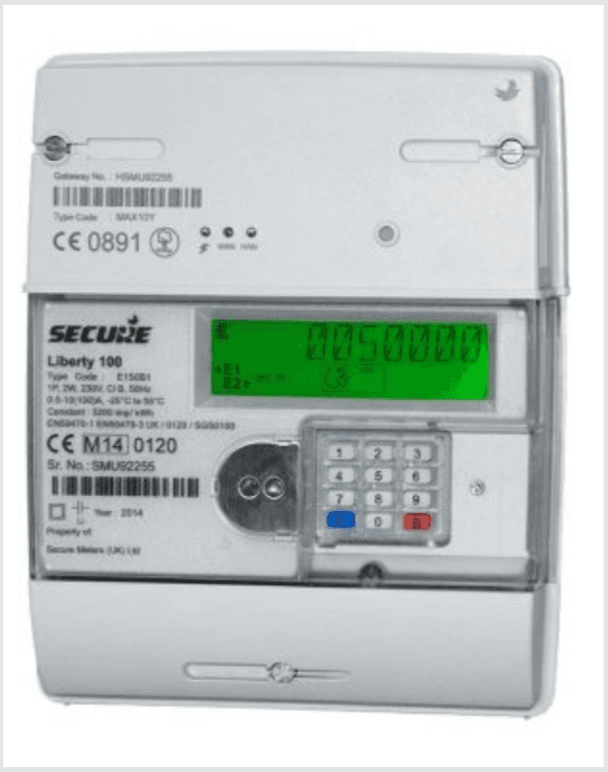
- Press 6 on the keypad.
- You will see the letters IMP R01 appear on the screen.
- Wait a moment, then eight digits will appear, followed by kWh towards the bottom right.
- Take the first 7 digits - this is your reading (nothing after the decimal point).
Electricity - Economy 7 (Peak and Off-Peak)
- Note down your peak rate as above (IMP R01), then continue to press 6 until you see IMP R02 - this is your off-peak screen.
- A second later, eight digits will appear with kWh towards the bottom right.
- Take the first 7 digits for each reading (nothing after the decimal place).
Gas Smart Meter
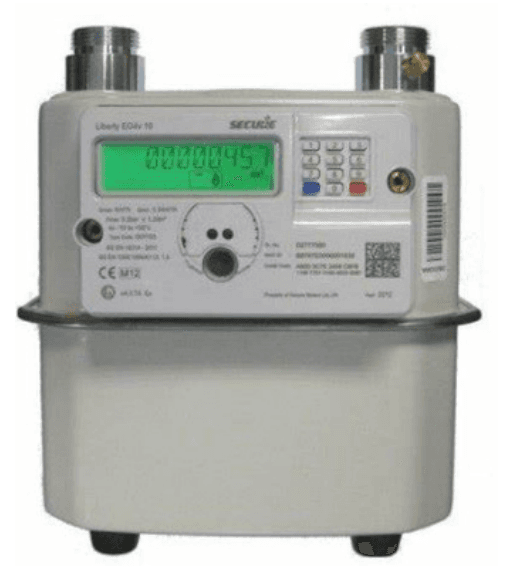
- Press 9 on the keypad.
- The word VOLUME will show on the screen.
- Your gas reading, in cubic metres (m3) will appear.
- Take the first five digits as your reading.
Export Reading
- Press 9 on the keypad.
- The words EXP kWh will appear on the screen.
- Your reading will appear in kWh.
- Take the first 7 digits - this is your reading.