How to use your In-Home Display

Your IHD can tell you everything you need to know about your energy usage.

What is an IHD?

  • Your In-Home Display (IHD) is not your smart meter, it's the little display unit that comes with your smart meter.
  • Instead of being attached to your smart meter, the IHD is a portable touch-screen monitor you can keep on display somewhere more convenient.
  • Too many walls between your IHD and smart meter might mean they can't connect, so generally it's best to keep them within 10 metres of each other.
  • You don't need a smartphone or WiFi to use your IHD - it connects to your smart meter wirelessly through a secure protocol called Zigbee (a low power, low frequency radio network similar to Bluetooth).

Get to know your IHD 3

If you have an IHD 3 it'll look like this.
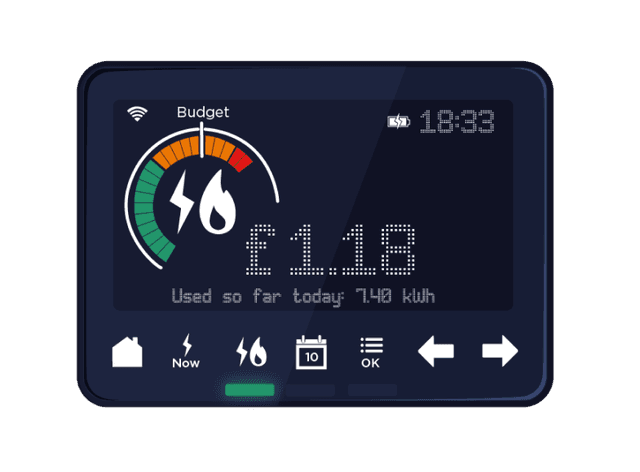
IHD 3 display

What do the icons and buttons do?

Battery

Battery

Shows how much battery your IHD has when unplugged (it's designed to stay plugged in, so won't last unplugged more than a few hours). If it dies, just plug it back in and press the on/off button at the back.
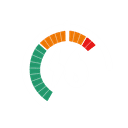
Energy dial

Energy dial

The curved bars show you how much energy you're using (press the 'Fuel' icon to toggle between gas, electricity and dual fuel). Set a budget to see a handy marker on the dial to help keep tabs on what you're using.

Fuel

Fuel

Press to see your gas, electricity or combined energy usage and cost.

Home

Home

Press this to head back to the home screen.

Now

Now

Click to see how much energy you're using right now.
Calendar

Calendar

Press to see what you've used today, this week, this month or this year.

Lights

Lights

Show whether your current usage is low (green), medium (amber) or high (red) in comparison to your typical usage.

OK

OK

Press to set budgets, change IHD settings, access meter info and more. Just use the left and right arrows to scroll through your options and press OK to select.

Set Budget

Click OK > Press the right arrow once > Press Adjust settings, then OK > Press Set budget, then OK > Press Calendar > Select how long you want the budget to be (daily, weekly, monthly) > Use the arrows to increase or decrease your budget > Click OK once you're happy with the amount.

Try to set a realistic weekly or monthly budget to keep an eye on your energy use. Please note, if you go over budget, your supply won't stop - it's just a helpful tool to see how your actual usage compares with your ideal usage.

In-Home Display FAQs

What does my IHD do?

Your IHD tells you how much your energy is costing over a period of time. By having access to your smart meter readings, the IHD is also able to show how your current usage compares to your historic usage; brand new smart meters need a bit of time to build up a picture of your usage to do this. IHDs help you monitor your energy usage, and can be used to see where you might save on energy by changing how you use energy, or by investing in efficient appliances.

Why won't my IHD switch on / why is the screen blank?

We've written a useful blog on how to resolve your IHD issues and easy ways to check how much energy you're using.

Do I have to leave my IHD plugged in?

No. It has an in-built rechargeable battery that enables you to walk around the house and turn your appliances off and on to see how much energy they use. IHDs aren't designed to be unplugged for long periods - most generally have a few hours charge - so remember to plug it in again when you're done.

How much electricity does an IHD use?

A tiny amount. Our IHDs use about 4-5kWh of electricity a year. Based on current prices, that's a few pence every week.

Does my IHD show the prices including VAT?

Yes. All the prices and unit rates shown on your IHD screen include VAT.

Will I lose all my data if I unplug my IHD?

No. It'll automatically refresh your data once it's plugged back in.

Why does my IHD show I've been using energy even though I've been away from home?

Your energy costs include the energy you use and your standing charge. Your standing charge is displayed on your IHD each day whether you are using energy or not. The daily standing charge is added at around midnight each day.

Where should I keep my IHD?

For the best connection, keep your IHD within around 10 metres of your smart meter. Thick walls can weaken the signal, so keeping it in the same room as your meters is usually best, or at least within the vague line of sight of your smart meter.

I have both gas and electricity, why is the IHD only showing data for gas?

As long as your lights are on, you're still being supplied with energy and the meter is recording your usage. If you can't see the electricity on your IHD, it may mean the meter is not connected to the IHD. Try moving your IHD closer to your electricity meter, turn the IHD off, wait a minute and turn it on again. If after 48 hours your IHD is still not displaying data for both fuel types, get in touch.

Do I take my IHD if I move home?

No, as it's linked to the meters in your property, and you aren't taking those with you! Please leave the IHD behind (best to switch it off and leave it somewhere visible).

I've changed my tariff, why is my IHD showing the old tariff?

Your energy supplier needs to send an update to the IHD to get the new tariff showing. We usually do this remotely automatically, and it can take a few days once we have to actually update on your meter. If your new tariff information still isn't showing on your IHD after 2 weeks, please get in touch.